Newer isn't the goal
Visitors arrive but don't enquire. People browse your services and leave without understanding what makes you different. Organic traffic grows while conversions stay flat. The instinct is to redesign the website.
Sometimes that's the right call. But a new visual identity, fresh animations and a cleaner layout won't fix unclear messaging, poor navigation or a broken path to enquiry. A good website redesign strategy starts with a different question: what should the website do better than it does today?
We treat a redesign as a product problem, not a visual exercise. Understand the experience you have, find the changes that matter, and carry those decisions all the way through design and development. Here is the process, in order.
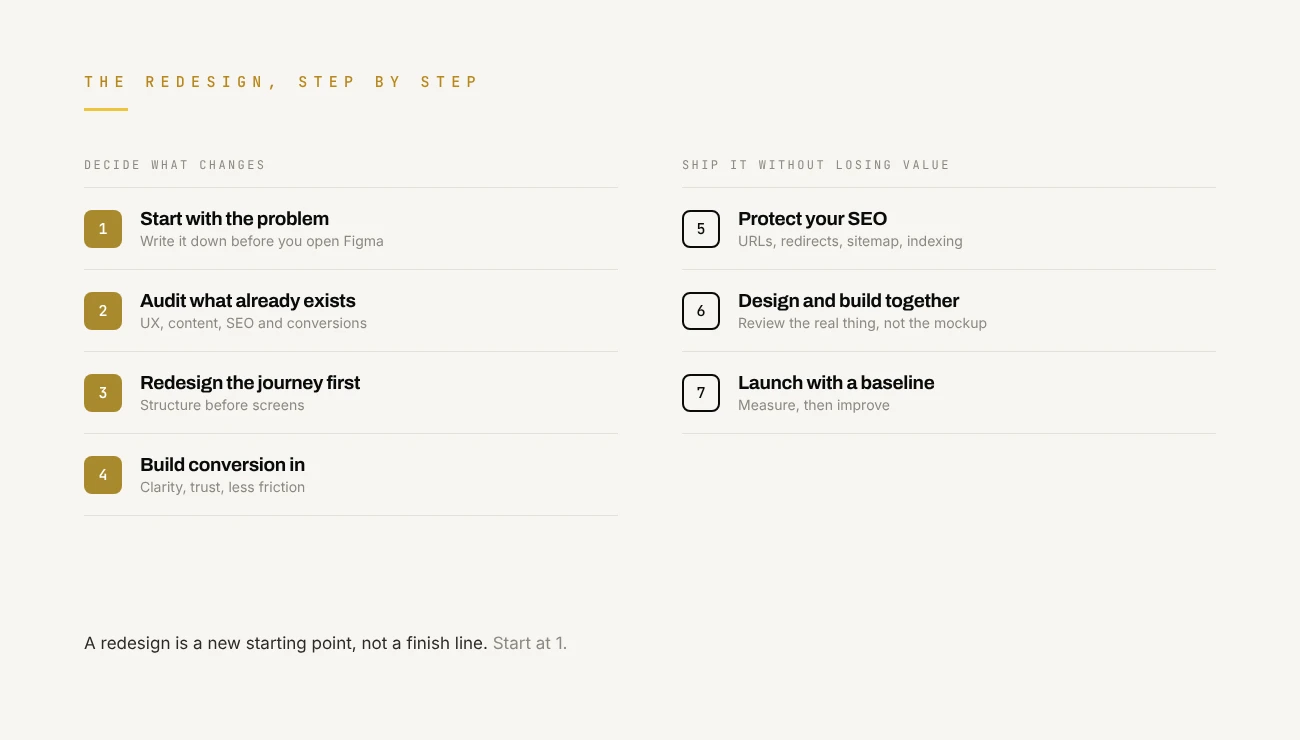
1. Start with the problem, not the design file
Before opening Figma or collecting references, name the reason for the redesign. It is usually one of these:
- Visitors don't convert. People arrive but rarely complete the action you want.
- The message isn't clear. Visitors struggle to understand what you offer, who it's for, or why it matters.
- The experience creates friction. Navigation, forms, page structure or mobile layouts make important tasks harder than they should be.
- The website no longer reflects the business. Your services have moved on, but the site still tells an older story.
- The technology limits growth. The platform makes content updates, performance work or new features harder than they need to be.
These are different problems with different fixes. If visitors reach your pricing page and don't enquire, a new homepage layout won't help. The issue is more likely pricing clarity, missing proof, or an offer that doesn't match the audience. If people leave before they understand what you do, the problem sits much earlier in the journey.
If you can't describe the problem a page needs to solve, you're not ready to design the solution.
2. Audit the website before you replace it
Your current site is full of evidence: search data, analytics, customer feedback and what you see when real people use it. That evidence tells you what to keep and what to change. A website UX audit should cover four areas.
- User experience. Can a first-time visitor tell what you offer within a few seconds? Is navigation organised around what users need? Are the important actions easy to find? Do forms ask for more than they need? Are loading, empty, success and error states handled?
- Content and messaging. Look for vague headlines, repeated sections, unexplained jargon and claims with nothing behind them. Your homepage doesn't need to explain everything. It needs to establish relevance, show value and point to the next useful step.
- SEO and performance. Review organic landing pages, search queries, indexed URLs, internal links, mobile usability and Core Web Vitals. Pages that already bring relevant traffic or enquiries are assets to protect, not pages to replace casually.
- Conversion performance. Map the steps from first visit to the action that matters. On a service site that might be landing page, service page, case study, enquiry form. Find where people drop off. Analytics shows you where; user testing and feedback tell you why.
The output of an audit is a prioritised list of problems backed by evidence, not a moodboard of visual preferences. If you want a second pair of eyes on yours, that is exactly what our free UX audit is for.
3. Redesign the journey before the interface
A common website redesign mistake is designing individual screens before deciding how the experience should work. A beautiful homepage can't make up for a confusing journey.
Start with your main audiences, their goals, and the questions they need answered before they decide. A SaaS founder choosing a product studio, for example, usually wants to know:
- Whether the studio has built something similar before.
- What working together actually looks like.
- What the team will deliver.
- How scope, timelines and costs are handled.
- What happens after launch.
Your website should make those answers easy to find. That shapes the information architecture, navigation, page hierarchy, content order and calls to action. Visual design comes after the structure supports the journey.
Design for decisions, not just scrolling. Every important page should move the visitor forward. A service page explains the problem, describes the approach, shows relevant work, answers common concerns and offers a clear next step. A case study goes beyond nice screenshots: the challenge, the decisions, the work delivered and the outcome, backed by verified evidence wherever possible.
4. Make conversion optimisation part of the redesign
Conversion optimisation isn't about adding more buttons. A conversion happens when the right visitor understands the offer, trusts the business and can take the next step without friction. A redesign should work on all three.
- Clarify the value proposition. Your headline should say what you do, who you help and why it matters. Lines that could belong to any business make it harder for the right people to recognise themselves.
- Earn trust with evidence. Relevant case studies, testimonials, a clear process and real examples of your work. Keep every claim accurate and attributable. One specific, true proof point beats an impressive number nobody can check.
- Remove friction. Review forms, navigation, mobile layouts and the number of steps it takes to finish an action. Ask only for what you need at that stage, and say what happens after someone submits.
- Measure the conversions that matter. Qualified enquiries, demo bookings, sign-ups, purchases or completed onboarding, depending on your business. Not button clicks or time on page: a longer visit isn't necessarily a better one, and more enquiries aren't worth much if they're poorly qualified.
5. Protect SEO during the website redesign
A redesign can improve search performance. It can also damage it if URLs, content and internal links change without a plan. Search engines need to understand which pages exist, what they're about and how they relate to each other, so your redesign should keep that clear. Before launch:
- Audit existing URLs. Find the pages that get organic traffic, backlinks and valuable search impressions.
- Keep URLs where you can. If one has to change, add a permanent redirect to the most relevant new page.
- Keep valuable content. Don't remove useful sections just because the new design looks cleaner without them.
- Review titles and descriptions. Keep them descriptive, unique and matched to what the page is for.
- Maintain internal links. Update navigation, links inside your content and related-content links.
- Check indexing controls. Make sure no important page is blocked by a leftover noindex tag or robots rule.
- Validate structured data. Make sure any schema markup is still accurate and valid.
- Test mobile performance. Check real page behaviour, responsive layouts, image weight and Core Web Vitals.
- Update the XML sitemap. List the correct canonical URLs and resubmit it.
- Monitor after launch. Use Google Search Console and analytics to catch indexing problems, traffic changes and conversion issues early.
One honest caveat: a redesign doesn't guarantee better rankings. Rankings depend on relevance, competition, technical quality, authority and much more. The goal is a site that's easier to use and understand, without losing the visibility you've already earned.
6. Treat development as part of design
The design approved in Figma isn't the product. The experience people get in the browser is.
Small gaps between design and build add up: spacing that drifts, missing interaction states, inconsistent type, slow animations, controls a keyboard can't reach, layouts that break on mobile. That is why design and development should inform each other through the whole redesign.
Before development starts, define interaction states, responsive behaviour, component rules and content requirements. Prototype and test with users where you're unsure, and check technical constraints early. During the build, review the real thing across screen sizes and browsers: forms, navigation, keyboard use, loading and errors, not just the happy path. Build performance and accessibility in from the start instead of patching them at the end.
At Dcycle, design and engineering sit in one team, so decisions get tested against real constraints early. It shortens the distance between what was designed, what was built and what people actually use.
7. Launch with a measurement plan
A redesign doesn't end when the new site goes live. Before launch, record a baseline for the numbers you want to improve. Depending on your goals, that might include:
- Organic traffic to key landing pages.
- Qualified enquiries or demo bookings.
- Conversion rate by landing page.
- Form completion and abandonment.
- Page performance and Core Web Vitals.
- Engagement with service pages and case studies.
Then check that analytics events, conversion tracking, redirects, canonical tags, forms and key integrations all work.
After launch, compare against the baseline while allowing for seasonality, traffic mix, campaigns and anything else that changed. Don't draw big conclusions from a few days of data. Give it enough time and traffic for real patterns to show, and look into surprises before you credit or blame the redesign. Then use what you learn to plan the next round of improvements.
A website redesign checklist
Before you approve your next redesign, make sure you can answer these.
- Have we named the business problem the redesign needs to solve?
- Have we reviewed analytics, user feedback and current search performance?
- Do we know the main audience and the actions they need to complete?
- Is the information architecture built around user needs?
- Does every important page have a clear purpose and next step?
- Have we planned how to keep URLs, content and SEO value?
- Have we covered accessibility, responsive behaviour and performance?
- Are design and development decisions made together?
- Have we defined success metrics and checked the tracking works?
- Is there a plan to review performance and keep improving after launch?
If several answers are still unclear, settle them before you commit to a full rebuild.
Website redesign questions we hear most
Will a website redesign hurt my SEO? It can, if URLs change without redirects, ranking content gets cut, or pages are accidentally blocked from indexing. Plan your redirects, keep valuable content, update the sitemap and watch Search Console after launch, and most of that risk goes away.
Should I redesign the whole website or fix a few pages? Let the evidence decide. If the problems sit in one part of the journey, such as pricing or a form, fix that first. A full rebuild makes sense when structure, positioning or technology hold the whole site back.
What should I measure after a website redesign? The outcome the redesign was meant to improve, such as qualified enquiries, demo bookings, sign-ups or purchases, alongside organic traffic to key pages and Core Web Vitals. Compare everything against a baseline recorded before launch.
Should the same team design and build the new website? It isn't required, but it helps. When designers and developers work together from the start, interaction states, responsive behaviour and performance are decided early instead of getting lost in the handoff.
So, when is a website redesign actually worth it?
A redesign makes sense when the current experience, structure, positioning or technology stops your business reaching its goals, and when the evidence says a redesign is the right fix.
Sometimes the answer is a complete rebuild. Sometimes it's a clearer service page, a better onboarding flow, a faster mobile experience, or a few targeted changes based on user research. What matters is not treating a redesign as a cosmetic project.
Start with the problem. Understand the people using the site. Protect what already works. Design around the decisions people need to make, and measure what changes after launch. That is how you get a website that does more than look good.
If your website isn't delivering the results you need, get a free UX audit. We'll show you where the friction is, what to fix first, and whether you need a redesign at all.